Members App: Show how busy the club is
Objective: Help customers pick the best time to come to the gym for the best experience for them.
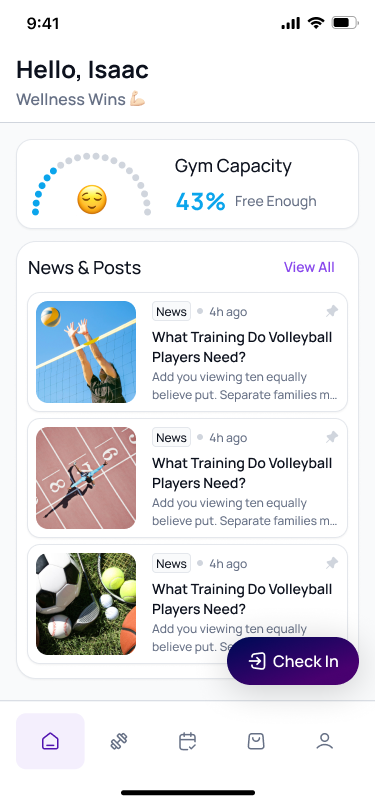
Feature: Allow owners to set their gyms capacity and then in app turn on a widget to show the level in the gym on the home page of the members app.
Would be optional and turned on per club.
Design:
Log in to comment and vote
Comments3
Isaac Buchanan
Nov 7, 2025
Hey All,
As you may have already seen we released this update yesterday.
You can see the post: Customise Your Member App Homepage! for details
To enable this just first:
Go to Settings > Club and add your clubs maximum capacity to your settings
Go to Settings > Members App and toggle on the “Club Capacity” widget and save
Thats it! It will be live the next time you open your members app!
Kind regards ,
Gymflow Support
Feb 12, 2024
Hi @Liz Hurst this is a great idea, we will be able to tackle this after we finished the gym check ins feature as then we will have this information.
Might I suggest we will also need to know the capacity of your gym, members might see a number and think its busy but your gym is big enough to cope.
If we allow you to enter your capacity it could show like 80/100 or 80% Capacity, would that work?
Liz Hurst
Feb 14, 2024
Hi! We are a small gym so we would estimate our capacity to be about 30 people. Yes that would work and be a great tool for our members to have a more efficient workout.